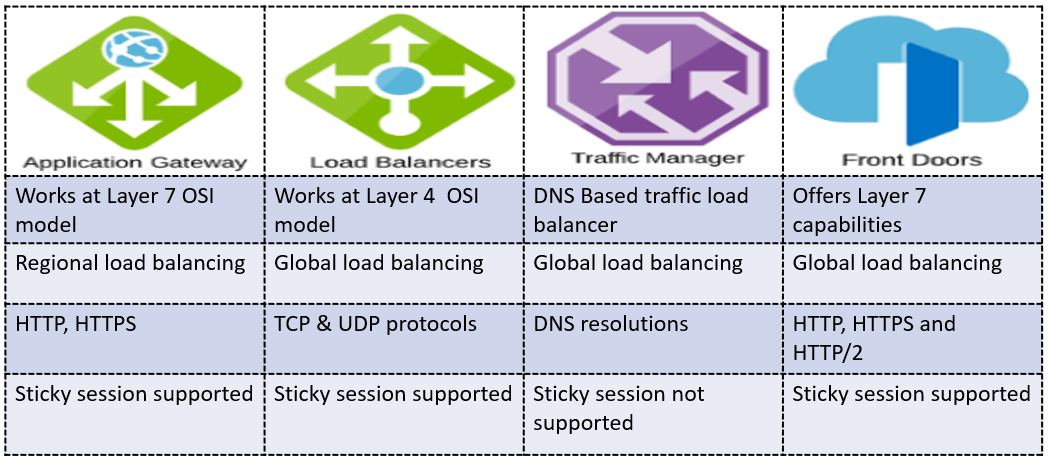
Distributing traffic across multiple servers is fundamental to building scalable, highly available applications on Azure. Microsoft provides two primary services for this: Azure Load Balancer and Azure Application Gateway. They are not competitors — they operate at different layers of the network stack and are often used together. Understanding when to use each saves you both money and architecture complexity.
The OSI Layer Difference
The key distinction is the OSI layer at which each service operates:
- Azure Load Balancer: Layer 4 (Transport). It makes routing decisions based on IP address and TCP/UDP port only. It has no visibility into the content of the request — it does not read HTTP headers, cookies, or URLs.
- Azure Application Gateway: Layer 7 (Application). It understands HTTP/HTTPS traffic. It can route based on URL paths, hostnames, query strings, and HTTP headers. It can also inspect and modify the request before forwarding it.
This difference drives every use-case decision: if you need content-based routing or HTTP-level security features, choose Application Gateway. If you need pure TCP/UDP load balancing for any protocol, choose Azure Load Balancer.
Azure Load Balancer
Azure Load Balancer distributes inbound traffic across a backend pool of VMs or instances in a Virtual Machine Scale Set. It supports:
- Public Load Balancer: Distributes internet traffic to VMs in a VNet. Provides a single public IP that maps to multiple private IPs.
- Internal Load Balancer: Distributes traffic within a VNet — for example, between the web tier and the application tier.
# Create a public load balancer with a frontend IP
az network lb create
  --resource-group rg-network-demo
  --name lb-webservers
  --sku Standard
  --public-ip-address pip-lb-webservers
  --frontend-ip-name FrontendIP
  --backend-pool-name BackendPool

# Add a health probe (TCP on port 80)
az network lb probe create
  --resource-group rg-network-demo
  --lb-name lb-webservers
  --name HealthProbe-HTTP
  --protocol tcp
  --port 80

# Add a load balancing rule
az network lb rule create
  --resource-group rg-network-demo
  --lb-name lb-webservers
  --name LBRule-HTTP
  --protocol tcp
  --frontend-port 80
  --backend-port 80
  --frontend-ip-name FrontendIP
  --backend-pool-name BackendPool
  --probe-name HealthProbe-HTTP
The Standard SKU Load Balancer includes zone redundancy and supports up to 1,000 backend instances. Always use Standard SKU for production — Basic SKU is free but lacks zone redundancy and SLA.
Azure Application Gateway
Application Gateway is a Layer 7 load balancer with an integrated Web Application Firewall (WAF), SSL termination, and URL-based routing. Use it when you need to:
- Route
/api/*to an API backend pool and/static/*to a different pool. - Host multiple websites behind a single gateway using host-based routing.
- Terminate SSL at the gateway (offloads decryption from backend servers).
- Protect your application from OWASP Top 10 vulnerabilities (SQL injection, XSS, etc.) with WAF.
- Perform HTTP header rewriting or URL redirects.
# Create an Application Gateway (this takes ~5-10 minutes)
az network application-gateway create
  --resource-group rg-network-demo
  --name appgw-prod
  --location eastus
  --sku WAF_v2
  --capacity 2
  --vnet-name vnet-prod
  --subnet subnet-appgw
  --public-ip-address pip-appgw
  --http-settings-port 80
  --http-settings-protocol Http
  --frontend-port 443

# Enable WAF in prevention mode
az network application-gateway waf-config set
  --resource-group rg-network-demo
  --gateway-name appgw-prod
  --enabled true
  --firewall-mode Prevention
  --rule-set-type OWASP
  --rule-set-version 3.2
URL Path-Based Routing Example
A common pattern is routing requests to different backend pools based on the URL path:
https://app.yoursite.com/api/*→ API servers backend poolhttps://app.yoursite.com/images/*→ Storage account or CDN originhttps://app.yoursite.com/*→ Web server backend pool (default)
Configure path rules in the Portal under Application Gateway > Rules > Path-based routing or with ARM templates for repeatability.
When to Use Both Together
A production architecture might use both services in a single request path:
- Internet traffic hits the Application Gateway (WAF + SSL termination + URL routing).
- Application Gateway forwards to an Internal Load Balancer in the backend tier.
- The Internal Load Balancer distributes to a pool of application VMs or VMSS instances.
This layered approach gives you HTTP-level security at the edge and pure TCP-level distribution inside the private network.
Cost Comparison
Azure Load Balancer (Standard) charges per rule and per GB of data processed — typically very low cost. Application Gateway WAF_v2 charges per gateway hour, capacity unit, and data processed — significantly more expensive but justified by the WAF protection and routing capabilities it provides. For internet-facing production applications, the WAF cost is almost always worth it.
Key Takeaways
Use Azure Load Balancer for TCP/UDP load distribution across VMs and for internal tier-to-tier traffic. Use Application Gateway (WAF_v2) for internet-facing HTTP/HTTPS workloads where you need SSL termination, URL-based routing, and OWASP protection. Combine both in a layered architecture for production-grade security and scalability.